NEW AIRIS · Ask your Odoo and it answers on WhatsApp, by text or voice See how it works →
Pulpo ERP

Run your whole business
from a single place

Point of sale, inventory, purchasing, expenses, banking and SAT invoicing — connected to each other and always up to date. Like an octopus: many arms, one brain.

🛒 Point of sale · 📦 Inventory · 🛍️ Purchasing · 💸 Treasury · 🧾 CFDI 4.0 · 📈 Reports
Start free See a demo

Leave behind the POS on one side and the accounting on the other. In Pulpo ERP every sale, purchase and payment shows up instantly in your inventory and your P&L.

Why Pulpo

They're not separate processes: it's one single brain

Tie your daily operation to your real numbers. No double entry, no separate spreadsheets.

🔗

Everything connected

A sale lowers your inventory, a payment moves your bank balance, and it all lands in your P&L. No double entry.

📊

From the register to the books

It's not just a POS: you track expenses, purchasing, treasury and your business's real profit.

🧾

Built-in CFDI invoicing

Stamp sales, generate the global invoice and let your customers self-invoice.

🇲🇽

Built for Mexico

VAT, CFDI 4.0, payment methods, global invoice and expense deductibility.

Easy to use

Clean interface, smart search on every list, and a Help Center with screenshots and search.

🏢

Multi-company

Manage several branches or companies from a single account.

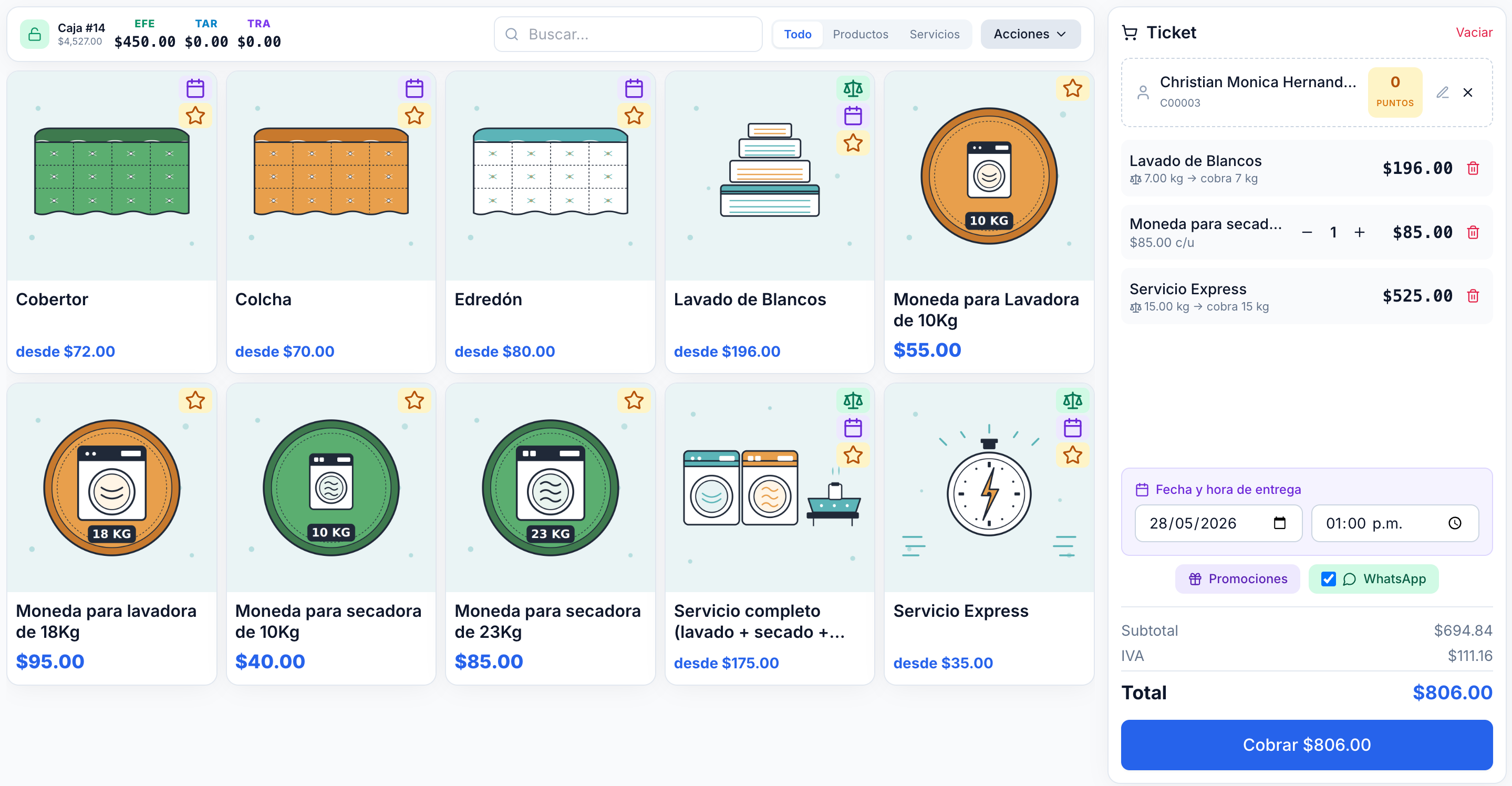
🛒 Point of sale

Check out fast, balance every time

Register by shift with open and close with cash count, split payments (cash, card, transfer), products by weight or with variants, and optional control to sell without stock.

Print the receipt or send it over WhatsApp. Voids follow permissions: cashiers only for today, admins for past days.

Every sale updates inventory, cash and your income statement at the same instant.

Pulpo ERP point of sale screen with catalog and side receipt
Modules

Every arm, working together

From the counter to the books. Every module feeds the others in real time.

📦

Inventory and catalog

Products with price, cost, VAT and images. Warehouses, stock moves, physical counts and valuation at cost. The average cost recalculates itself with every purchase.

🛍️

Vendor purchasing

Purchase orders with goods receipt, auto-filled last cost per vendor and full history. Import your XML (CFDI) by dragging them in and track payment status.

🧾

Expenses and outflows

Record deductible and non-deductible expenses, import CFDI automatically (no duplicates) and keep everything ready for your accountant.

💸

Unified treasury

Bank and cash accounts with balances, transfers and movements. Pay expenses and purchases from one place, in full or in part, and every payment posts to your journal.

📈

Sales and customers

History with search, filters, grouping and charts. Customer directory with tax details, a points program and WhatsApp contact.

📑

Reports and finance

Income statement with revenue, costs, expenses and profit, exportable to Excel and PDF. Period close to lock down your numbers.

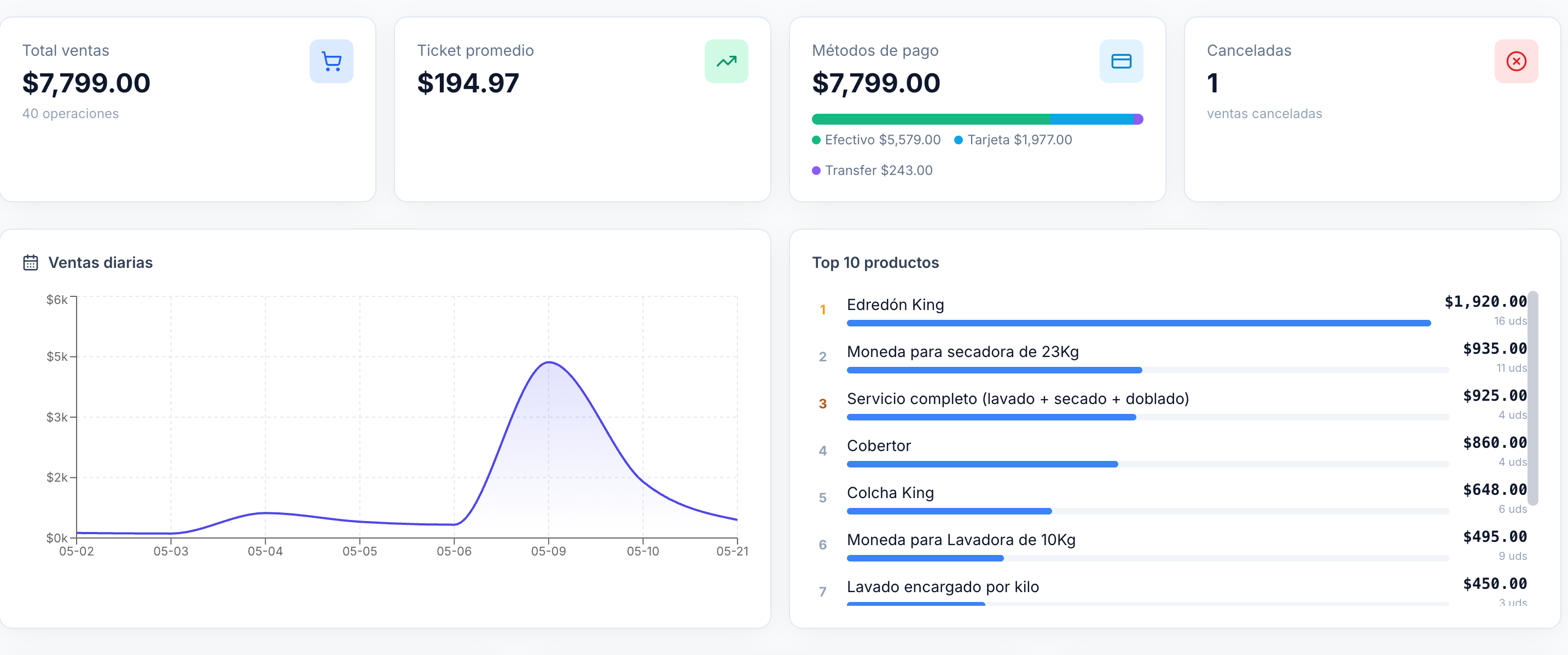
📈 Reports and finance

Know your real profit, without Excel

KPIs for the day, week, month and year on one screen: sales, average ticket, payment methods, top products and an income statement with revenue, costs, expenses and profit.

Pulpo ERP dashboard with KPIs, sales chart and top products
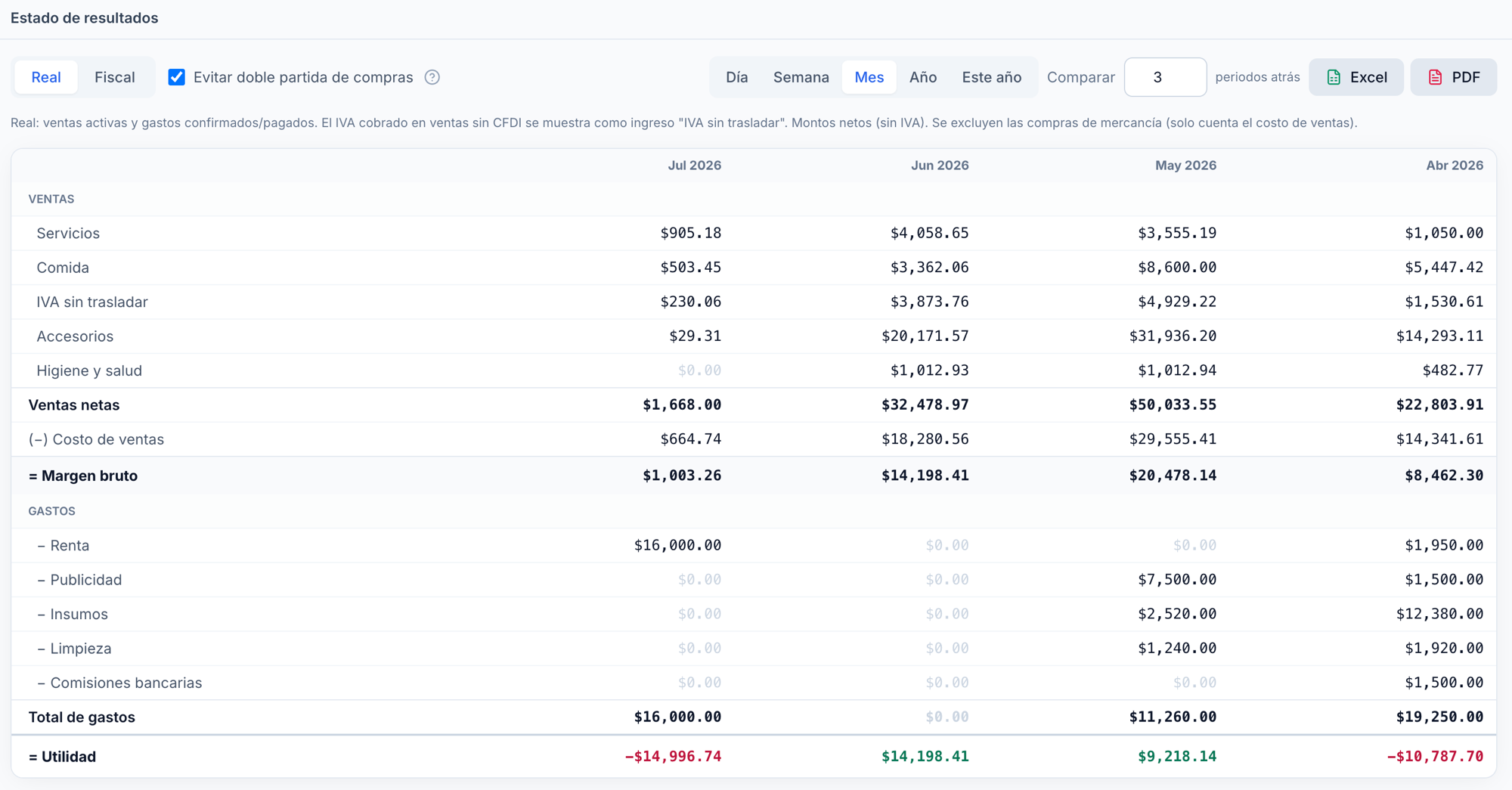
📑 Income statement

Your real profit, compared period over period

At any moment you know how much you sold, what that sale cost you and what you spent — so you see your real profit for the period. Compare it against earlier months and run your business with real control, not blind.

Pulpo ERP income statement: net sales, cost of sales, gross margin, expenses and profit compared month over month
💵
Net sales Everything you sold in the period, broken down by category.
📦
(−) Cost of sales What you actually paid for what you sold, at average cost.
🧾
(−) Expenses Rent, advertising, supplies, bank fees and more.
📈
= Profit What you truly earned (or lost), clear and in plain sight.

Switch between the Real and Tax views, compare several periods back and export to Excel or PDF. Close the period to lock down your numbers.

🧾 CFDI 4.0 invoicing (SAT)

Individual invoice, global invoice, or let the customer do it themselves

Upload your SAT CSD and connect to a PAC. Pulpo ERP stamps the CFDI and emails the PDF + XML, without the cashier lifting a finger.

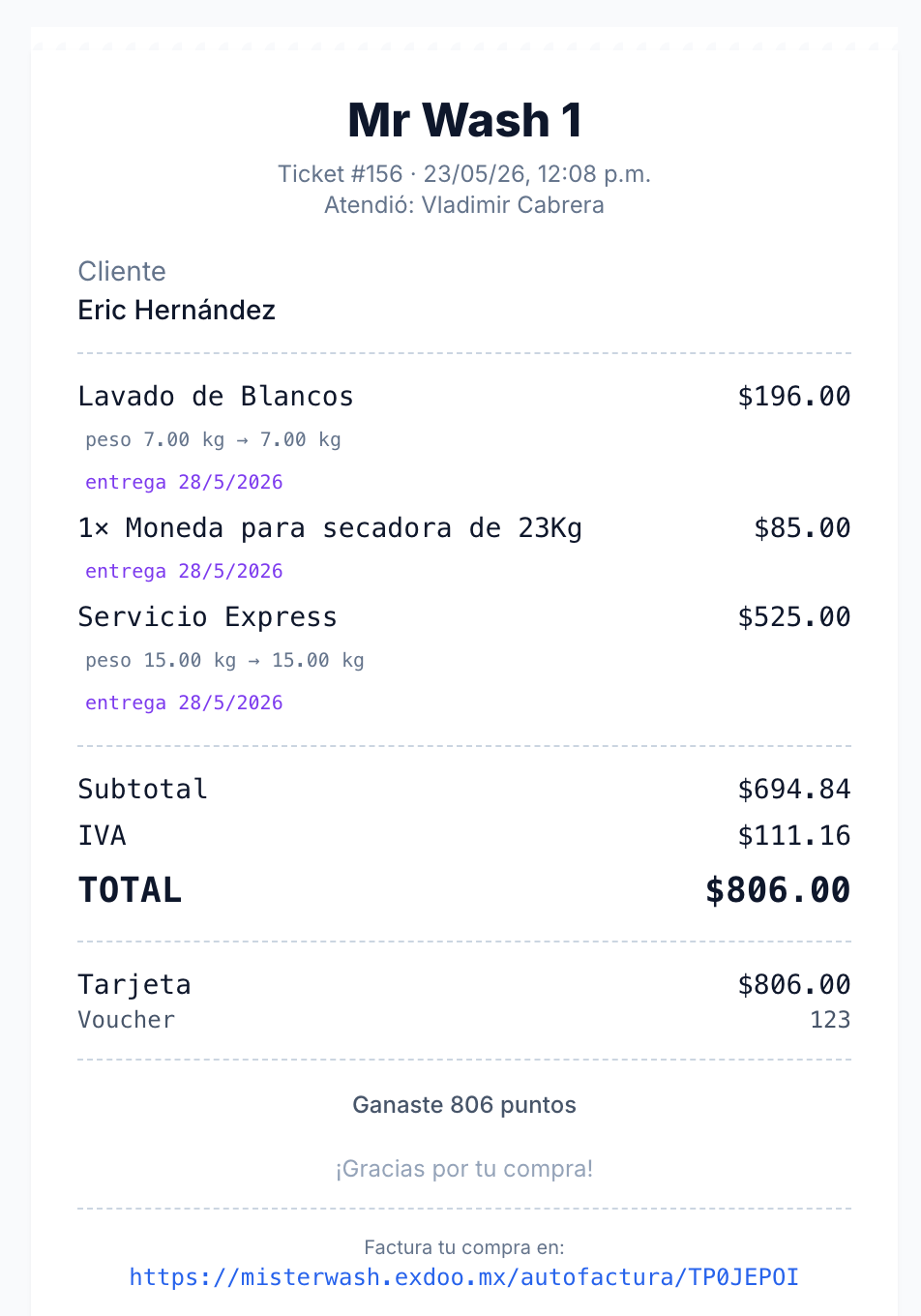
Self-invoicing: zero work for the cashier

Every receipt prints a code and a link. The customer opens it on their phone, enters their RFC and downloads the invoice on their own. Your cashier never asks for tax details at rush hour.

  • Individual invoice for one sale
  • Grouped invoice for several sales
  • Automatic global invoice for the period — daily or monthly
  • Automatic PDF + XML delivery by email
Printed Pulpo ERP receipt with a self-invoicing link
Cron active · 1:00 AM

Automatic global invoice, while you sleep

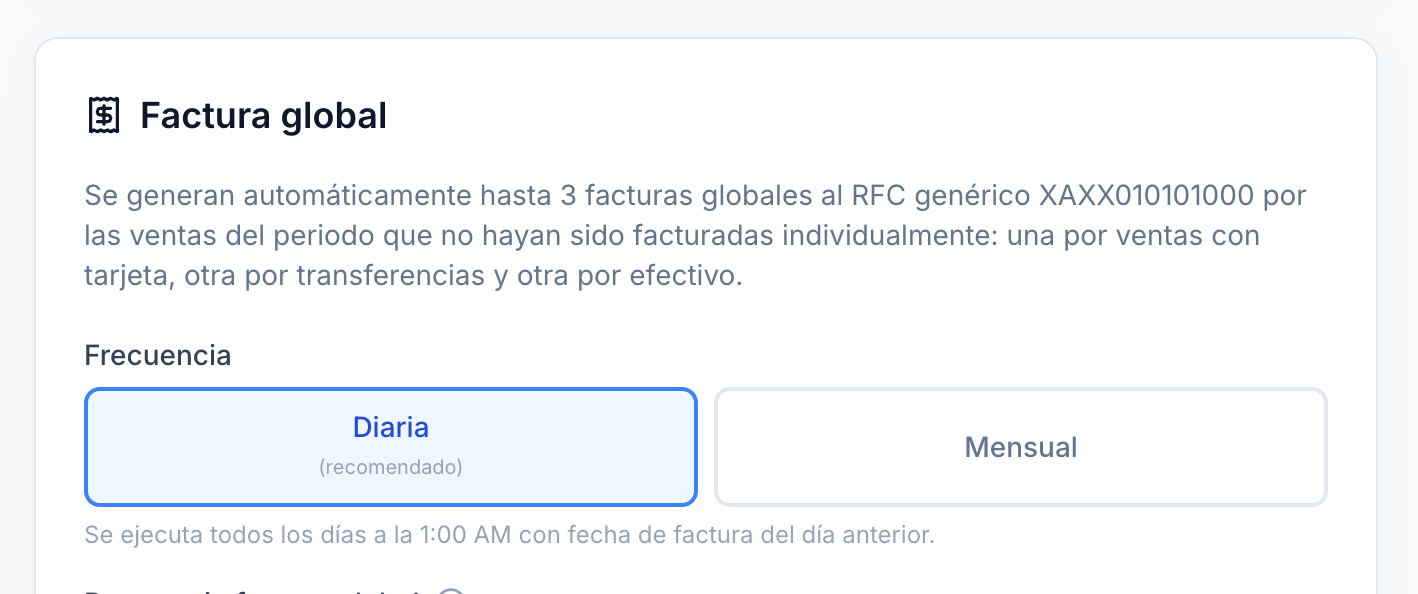
Pulpo ERP generates up to 3 global invoices to the generic RFC XAXX010101000 covering everything not invoiced individually — one per payment method, kept separate so your accountant reconciles them easily.

💵
Cash1 global CFDI · PUE method
$18,215.00
💳
Card1 global CFDI · PUE method
$7,977.00
🏦
Transfer1 global CFDI · PUE method
$3,561.00
🕐
Daily or monthly
you pick the frequency
📤
PDF + XML
to the business email
pulpo-erp.exdoo.mx/cfdi/global
Global invoice setup in Pulpo ERP with daily and monthly frequency
Is it for you?

For retail and service businesses that want order

If you need to control your register, inventory and money in one system, Pulpo ERP is for you — with one branch or many.

Laundromats
Pet stores
Grocery and convenience stores
Auto parts stores
Pharmacies
Stationery shops
Hardware stores
Retail in general
How it works

In 3 steps

1

Set up your business

Tax details, products, prices and your cash registers / bank accounts.

2

Sell and operate

Ring up sales at the POS, record purchases and expenses, pay your vendors.

3

Measure and decide

Review your income statement and invoice, with everything balanced.

Plans and pricing

Pick the plan that grows with you

Start free and move up when your business asks for it. Launch pricing for a limited time, no forced contracts.

Free
$0
Forever
  • 100 sales/month
  • 1 branch
  • 2 users
  • Inventory and customers
  • Basic reports
  • CFDI invoicing
Start free
Multi
$799/month + VAT
$999launch price
  • 2,000 sales/month
  • Up to 3 branches
  • Up to 10 users
  • CFDI + self-invoicing
  • Global invoice
  • Multi-company
  • Priority support
Get Multi
Cadena
$1,499/month + VAT
$2,100launch price
  • Unlimited sales
  • Unlimited branches
  • Up to 100 users
  • CFDI + self-invoicing
  • Global invoice
  • Multi-company
  • Dedicated support
Get Cadena

Need more than 100 users or a custom setup? Request a custom quote →

FAQ

Everything you need to know about Pulpo ERP

What is Pulpo ERP?

Pulpo ERP is an all-in-one business management system that brings point of sale, inventory, purchasing, expenses, treasury and CFDI 4.0 invoicing together on a single cloud platform.

Does Pulpo ERP issue CFDI 4.0 invoices with the SAT?

Yes. Upload your SAT CSD, connect to a PAC and stamp individual sales, generate the global invoice for the period, or let your customers invoice themselves. You download the XML and PDF and send them by email.

Can I use Pulpo ERP for free?

Yes. There is a free-forever plan with 100 sales a month, 1 branch, 2 users, and unlimited inventory and customers. Paid plans start at 299 pesos + VAT a month.

Does it work for several branches or companies?

Yes. Pulpo ERP is multi-company: you manage several branches or companies from a single account, depending on your plan.

What kinds of businesses is it for?

For retail and service businesses: laundromats, pet stores, grocery and convenience stores, auto parts stores, pharmacies, stationery shops, hardware stores and retail in general.

Do I need to install anything?

No. Pulpo ERP runs in the cloud from any browser, on a PC, tablet or register. No installs, no servers of your own.

Get your business in order with Pulpo ERP

Your point of sale, your inventory and your finances working together

Start today and get everything under control, with all arms on deck. No strings attached: create your free account or talk to sales for a demo.

Create my account

Rather have us show you? Talk to sales →