NEW AIRIS · Ask your Odoo and it answers on WhatsApp, by text or voice See how it works →

Attendance tracking · mobile app, time clocks, or both

Your presence counts, wherever you work.

With Idenua your team clocks in from their phone —Face ID, selfie and location— or at a fingerprint and face time clock. You see everything in one panel, with reports and Excel export. And if you use Odoo, punches land there on their own.

App $150 per 100 employees · Time clocks from $199 · VAT not included · No contract

NEWNo time clocks? Your team can clock in with the app alone
Mobile appFace ID · selfie · GPS
ZKTeco clocksfingerprint · face
Reports and Excelin your panel
See pricing
Two ways to clock in

Pick the one that fits. Or use both.

Not everyone works the same way: some walk into a plant, others work from home or on the road. Idenua covers both with the same panel, the same report and the same payroll.

Idenua app icon

With the Idenua app

$150 + VAT per month for every 100 employees

  • No hardware to buy. Install it on the employee's phone and you are done.
  • Face ID or the phone's fingerprint before every punch, plus a selfie as evidence.
  • Location and geofences: you set the valid zones for each person.
  • Check-in, lunch and check-out, based on their schedule.
  • Works offline: the punch is stored and sent later.
See how the app works
ZKTeco time clock

With time clocks

$199 + VAT per month, up to 3 clocks

  • Fingerprint, face or card at your plant, office or branch.
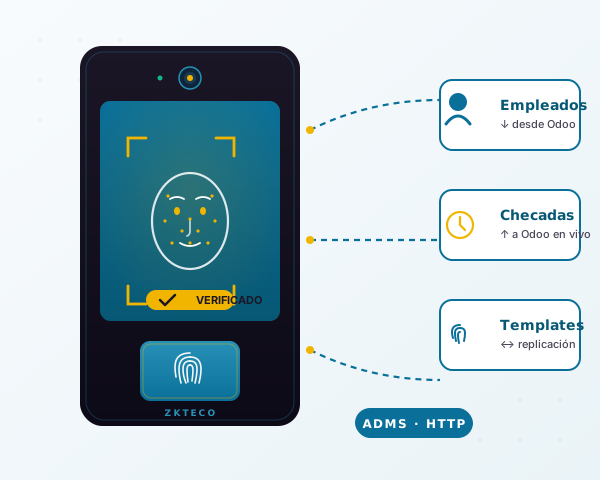
  • Works with the ZKTeco readers you already own, over ADMS.
  • A fingerprint is enrolled once and replicated to every clock on the site.
  • If the internet drops, the clock stores punches and sends them on reconnect.
  • Extra clock: $49 + VAT per month.
See how the clocks work

Both? They add up in the same panel: an employee can use the clock at the office and the app when working from home.

Before you buy

Which time clock is right for you?

There are four ways to record attendance. The difference that matters isn't the price of the device, but whether it stops a coworker from clocking in for someone else and how much work it leaves for HR.

Idenua works with ZKTeco fingerprint, face and card clocks, and with the app on the phone. You can combine them in the same panel.
Type Stops someone else from clocking in? Hardware Best for
Card or code time clock ✗No: cards and codes get shared The cheapest Basic control with few employees
Fingerprint time clock ✓Yes Affordable: the best seller Offices. Struggles with worn hands, dust or cuts
Facial time clock ✓Yes, and without touching the device A bit pricier than fingerprint Plants, warehouses, construction and staff with working hands
Phone app (Idenua) ✓Yes: Face ID or the phone's fingerprint, selfie and GPS None: it uses the employee's phone Home office, field sales and branches with no clock

A time clock alone isn't enough

Without software, clock-ins stay in the device: someone has to pull them over USB, gather them from each branch and build the report by hand. With Idenua they arrive on their own to a cloud panel, ready for payroll.

If you're buying one, ask for ADMS

Choose a ZKTeco clock with the ADMS feature (it shows up in the menu as cloud server or Cloud Server). That's how it connects straight to Idenua, with no software or server to install. Not sure which one? Ask us on WhatsApp and we'll recommend the model.

Time clocks for sale

Prefer that we source it for you?

You can buy your clock on your own —any ZKTeco with ADMS works— and manage it with Idenua. But if you'd rather not go hunting for one, we sell it to you already tested and ready to connect to Idenua, with the power adapter and shipping included. All three read face and fingerprint; what changes is how many people they hold. Pick one based on your headcount:

MB10VLFor small teams
$2,400+ VAT
Faces100
Fingerprints500
Records50,000
CardOptional

Ideal for up to ~100 people

  • Face and fingerprint recognition
  • 2.8" TFT display
  • Power adapter included · ADMS (direct to Idenua)
  • Free shipping across Mexico
Buy it
MB160IDFor medium and large teams
$2,950+ VAT
Users2,000
Faces1,500
Fingerprints2,000
Cards2,000
Records100,000

Ideal for up to ~2,000 people

  • Face, fingerprint and proximity card
  • 2.8" TFT display
  • Power adapter included · ADMS (direct to Idenua)
  • Free shipping across Mexico
Buy it
MB160PLUSThe fastest and most accurate
$3,200+ VAT
Users2,000
Faces1,500
Fingerprints2,000
Records100,000
CameraBinocular 1 MP

Same capacity as the MB160ID, but reads a face in under 0.35 s

  • Face, fingerprint and proximity card
  • Binocular 1 MP camera + Wi-Fi (4G optional)
  • Power adapter included · ADMS (direct to Idenua)
  • Free shipping across Mexico
Buy it

Prices in Mexican pesos · 16% VAT not included · Power adapter and free shipping across Mexico · All ship configured and ready to connect to Idenua. Not sure which one fits? Ask us on WhatsApp and we'll tell you.

How it works

From the box to clock-ins in Odoo in 3 steps

1

Set up your sites

Add every location from a single dashboard: head office, plant or branches. Each site can have several ZKTeco time clocks.

2

Connect your readers

In the ZKTeco reader's menu, enter the Idenua address in the cloud server (ADMS) option. Nothing to install on any computer.

3

See attendance in your dashboard

Every punch shows up instantly in the Idenua dashboard, ready for your hours report. And if you use Odoo, the check-in or check-out is created in Attendances too, with no manual work.

Smart replication

Enroll a fingerprint once. It lands on every reader at the site.

When an employee enrolls their fingerprint, photo or face on any reader, the template replicates automatically to the other readers at the same site. Everything is managed from the Idenua dashboard, without opening the manufacturer's software.

If you add a new reader tomorrow, it automatically receives every fingerprint, photo and face of the employees already enrolled. Zero manual re-enrollment.

The platform keeps track of which reader already has each template, so nothing gets left behind or duplicated.

Idenua Odoo ERP optional Reader A Reader B Reader C Auto-replication
New · Phone time clock for remote work

Remote workers clock in too. And you know it was really them.

Not all your employees walk past a ZKTeco clock. With the Idenua app, people working from home or in the field record their check-in, lunch and check-out from their phone. Every clock-in confirms identity with Face ID or the phone's fingerprint, takes a selfie and stores the GPS location. It reaches the same platform and Odoo, alongside the clock-ins from your readers.

  • Face ID or phone fingerprint
  • A selfie with every punch
  • GPS location and geofences
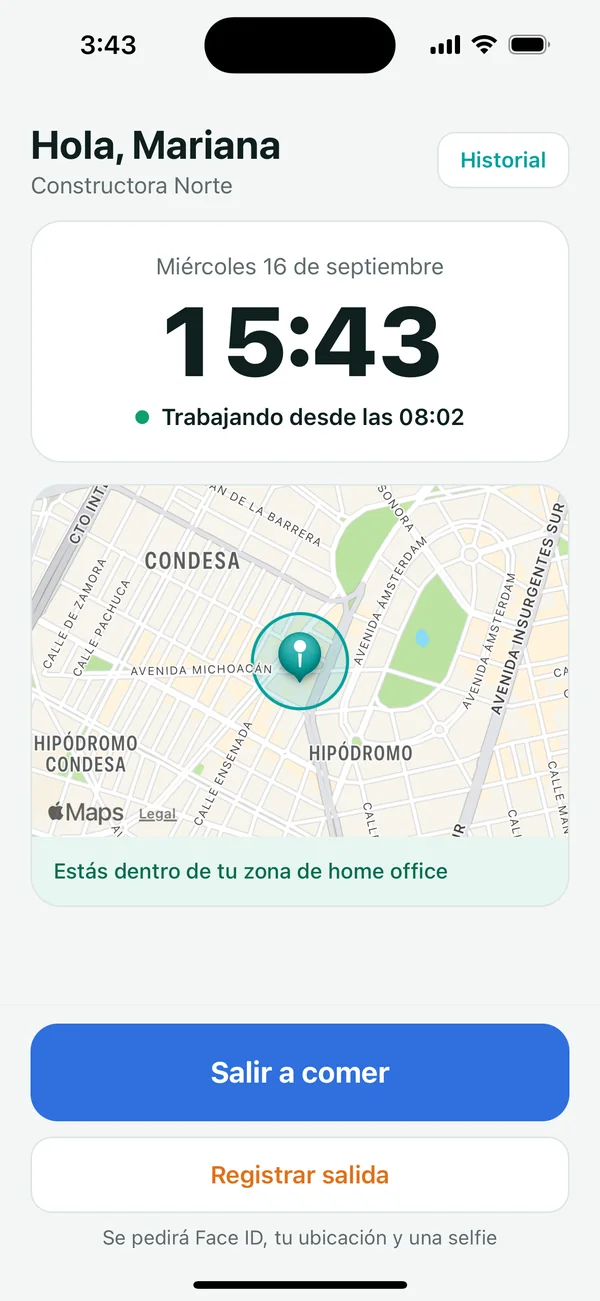
Idenua home screen: employee working since 08:02, inside her home office zone, with Lunch break and Check out buttons
Knows where they are in the dayCheck-in, lunch and check-out based on the employee schedule
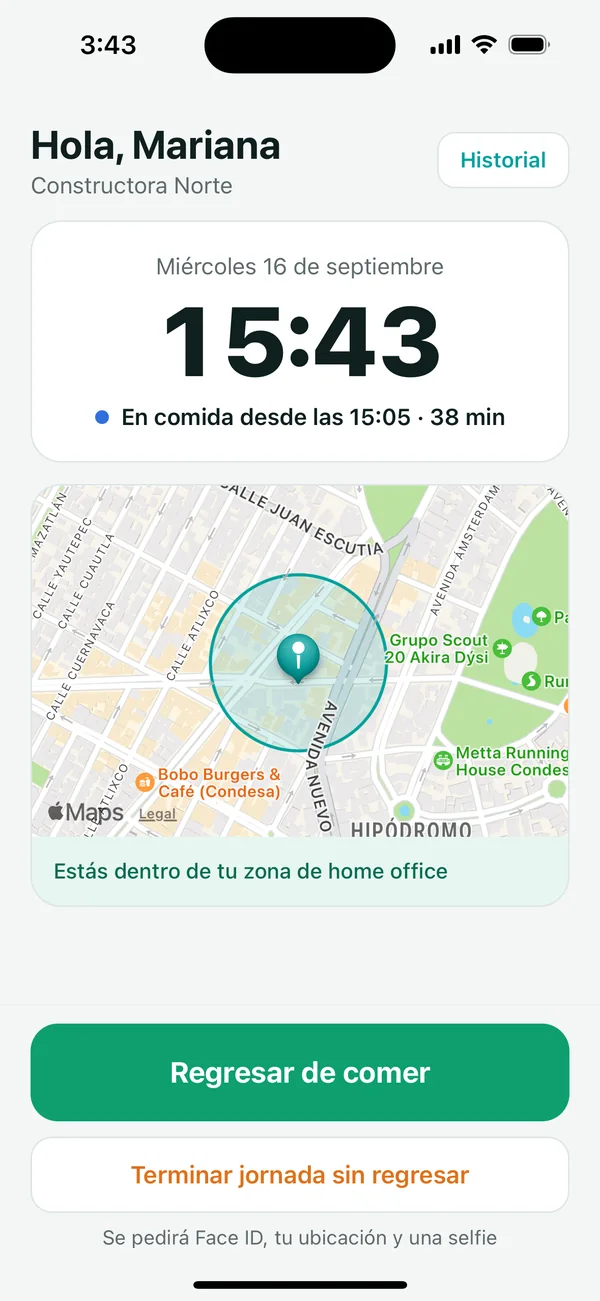
Idenua showing the employee on lunch since 15:05, 38 minutes elapsed, with a map of her geofence
Geofence on the mapSee their zone and whether they're inside before clocking in
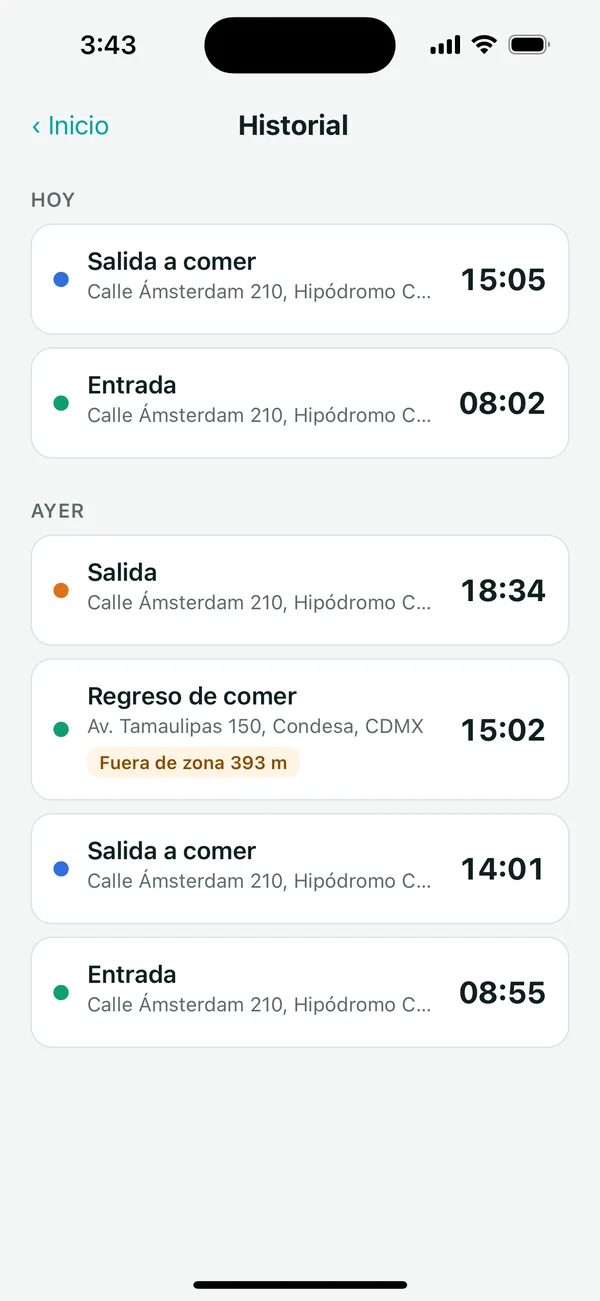
Clock-in history in Idenua with one clock-in flagged out of zone at 393 meters
Transparent historyEvery clock-in with its address, flagged if it was outside the zone

Verified identity

Before every clock-in the app asks for Face ID, Touch ID or the phone's fingerprint. The phone is linked to the employee with a QR code generated by HR, and there can only be one active phone per person.

Mandatory selfie

The front camera takes a photo on every clock-in. It's stored in your dashboard as proof and, if you use Odoo, attached to the attendance too. Nobody can clock in for someone else.

Geofences per employee

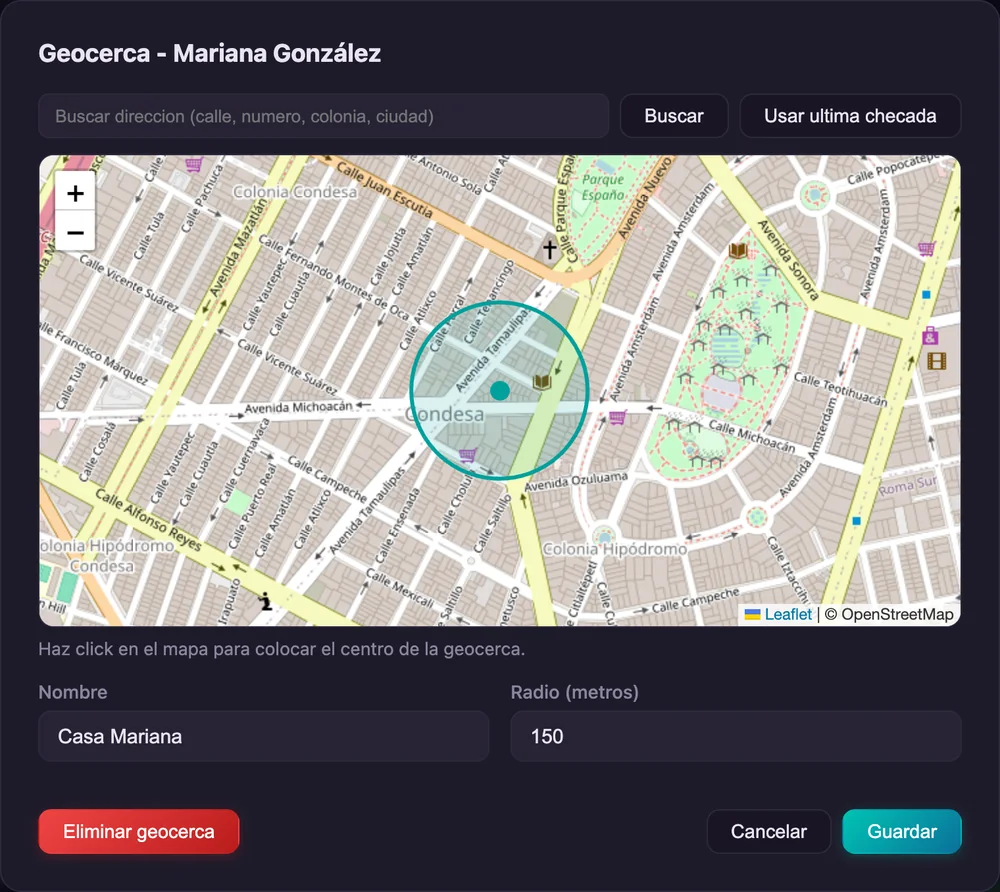
HR marks the home office address and the allowed radius on a map. If someone clocks in outside it, the clock-in is recorded flagged with the distance, in the dashboard and in Odoo.

Detects fake GPS

The app recognizes when the location comes from a GPS spoofing app and flags the clock-in for HR to review.

Lunch and employee schedule

The buttons change on their own: check-in, lunch break, back from lunch and check-out, based on the schedule assigned to them —the one in your Odoo if you use it—. It warns them if they went over their lunch time.

Works offline

With no internet, the clock-in is saved on the phone with its real time and sent automatically as soon as the connection is back.

HR sees everything in one dashboard

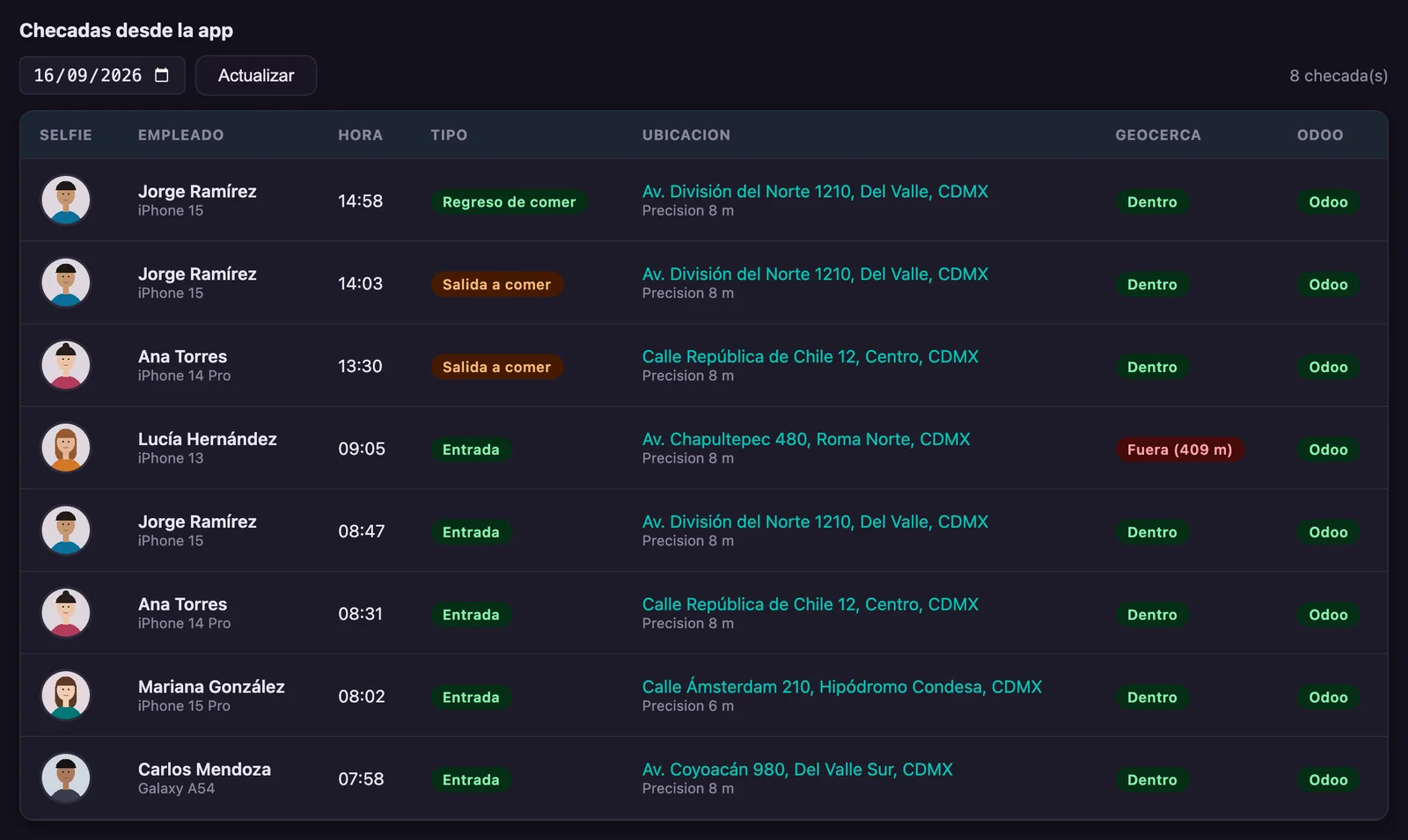
Clock-ins from the app show up with selfie, address, GPS accuracy and geofence result, next to the ones from your ZKTeco clocks. From there you activate phones, deactivate them when someone leaves the company and draw geofences. On Odoo 17 or later, the attendance also stores the location in its native fields with the selfie attached.

Idenua dashboard with app clock-ins: selfie, employee, time, clock-in type, address, inside or outside the geofence and Odoo sync
Today's clock-ins from the app: lunch breaks and returns, and one check-in outside the zone at 409 m.
Geofence editor in Idenua: map with an employee's home office address and a 150-meter radius
The geofence is drawn on the map: search the address or use the location of the last clock-in.
What Odoo 20 doesn't include: Odoo lets people clock in from the browser or its app, but it doesn't confirm who is clocking in, doesn't ask for a selfie and has no geofences; for that you have to buy third-party modules. And in BioTime the mobile app is a license bought separately. With Idenua, ZKTeco clocks and the app live on the same platform and work with Odoo 10 to 20. See the comparison.
Native Odoo 20 (BioTime PRO) vs Idenua

Does Odoo 20 already connect to ZKTeco? Yes, but through BioTime

Odoo 20 ships the Attendances ZKTeco BioTime module. Its own documentation makes it clear: the integration connects to the BioTime software, not to ZKTeco readers. To use it you need to buy BioTime, install it on a server and run Odoo 20 Enterprise. Here's how the two options compare:

Source: official Odoo documentation, “BioTime integration” and “Attendances”, and ZKTeco distributor prices in Mexico, September 2026.
What to compare Idenua
And nothing else
Native Odoo 20
requires BioTime PRO + a server + setup
How it connects ✓Straight to the ZKTeco reader over ADMS Odoo queries the BioTime server; BioTime talks to the readers
Extra license ✓None ✗Separate BioTimePro license: the smallest one (5 devices, 500 employees) ~$10,500 to $13,600 MXN, perpetual and tied to one server
Server ✓Not needed: runs in the Exdoo cloud ✗Your own server running BioTimePro, always on and reachable from Odoo
Odoo versions ✓10 to 20 Odoo 20 only
Odoo edition ✓Community and Enterprise Enterprise
When clock-ins arrive ✓In real time Every 12 hours, or when you press “Fetch”
Adding employees ✓Created in Odoo and pushed to the readers automatically Added in BioTime, then the “ZKTeco employee ID” is entered on each Odoo employee
Fingerprints and faces ✓Enrolled once and replicated to every reader at the site Managed in BioTime, outside Odoo
From clock-in to attendance ✓Automatic, hands-off They arrive as “transactions” to be processed; failed ones are fixed and reprocessed by hand
Clock in from a phone (home office) ✓iPhone and Android app with Face ID, selfie and GPS ✗BioTime's mobile app is a separate license; Odoo allows browser clock-ins without verifying who clocks in
Geofences and fake GPS ✓Geofence per employee and spoofed-location detection ✗Not included; requires third-party modules
Monthly fee From $199 MXN + VAT (3 readers) No monthly fee for the connector (included in Enterprise)
To be fair: if your company is already on Odoo 20 Enterprise, has already paid for BioTime, has its server running and is fine seeing clock-ins twice a day, the official integration will do. For every other case —Odoo 10 to 19, Community, no BioTime, several branches or anyone who needs attendance right away— Idenua is faster to get running and cheaper. As an Odoo Gold Partner, we help you choose the right option.
Real cost

What it takes to get clock-ins into Odoo

Example: a company with 3 ZKTeco time clocks currently running any Odoo version from 10 to 19.

The native Odoo 20 route

Official Odoo integration

  • BioTimePro Starter license (5 devices, 500 employees) $10,500–$13,600
  • Server running BioTimePro and its upkeep Extra
  • BioTime mobile app license, if you want it Extra
  • Upgrading your database to Odoo 20 Extra
  • Odoo Enterprise subscription Required
  • Installing BioTime and entering employee IDs Extra
Before your first clock-infrom ~$10,500 MXNthe smallest license, 5 devices and 500 employees, plus the server and the migration to Odoo 20

Idenua

Straight from the reader to Odoo

  • Monthly fee with 3 readers $199 + VAT
  • BioTime license $0
  • Server $0
  • Version upgrade Not needed
  • Odoo Community or Enterprise Both
First year$2,388 MXN + VATWhat BioTime costs pays for more than 6 years

Reference prices from ZKTeco distributors in Mexico (September 2026), VAT included in the license. They may vary by distributor and edition. Still want to upgrade your Odoo? Check out our Odoo migration service.

Supported versions

On Odoo 10 to 19? You don't need to upgrade to use ZKTeco

The official integration only exists in Odoo 20. With Idenua you connect your time clock today, on the version you already run, and when you decide to upgrade your Odoo the connection comes with you.

IdenuaCommunity and Enterpriseall 11 versions
1011121314151617181920
Odoo's own integrationEnterprise only, with BioTimeversion 20 only
1011121314151617181920

Idenua works across all 11 versions, so you connect your clocks today without migrating. The integration shipped with Odoo exists only in 20 Enterprise and needs BioTime.

Attendance control

Your clock-ins are also your defense

Keeping attendance control isn't only about knowing who showed up late. In Mexico, the Federal Labor Law puts the burden of proving your staff's working hours on the employer.

Art. 784

In a lawsuit, you prove the working hours

If an employee claims overtime, the law asks the company to show how long the workday lasted. Without reliable records, what the worker says is what counts.

Art. 804

Records you can produce

If you keep attendance controls, you must produce them in court. Idenua stores them in the cloud with date, time, location and selfie: nothing is lost, nothing is erased and no one alters them.

Payroll

Late arrivals, absences and overtime without data entry

The worked-hours report comes out of the panel and exports to Excel, or lands in Odoo if you use it. No more paper attendance sheets or Excel built by hand.

General information about the Federal Labor Law, not legal advice. Consult your labor attorney for your case.

Pricing

No BioTime license. No per-employee fees. No servers.

Idenua Plan

$ 199 MXN / month

Base plan with up to 3 time clocks across the sites you need. VAT not included.

Idenua app $150 + VAT per month

for every 100 employees clocking in from their phone. It can be purchased on its own, with no time clocks at all: from $150 + VAT per month.

Odoo 10 to 20 (Community and Enterprise)
Unlimited sites
Fingerprints, photos and faces in sync
Automatic replication between readers
Real-time Odoo webhooks
Admin dashboard
No BioTime license or server
WhatsApp support
Extra reader from the 4th reader on
+ $49 MXN / reader / month

Prices in Mexican pesos · 16% VAT not included · No minimum term · Cancel anytime

FAQ

ZKTeco time clocks and Odoo: common questions

How much does Idenua cost?
The app costs $150 MXN per month plus VAT for every 100 employees clocking in from their phone, and it can be purchased on its own. If you use time clocks, the base plan is $199 MXN per month plus VAT and includes up to 3 clocks; each extra clock is $49 MXN per month. No minimum-term contract.
Can I use Idenua without buying time clocks?
Yes. Many companies use the app only: employees clock in from their phone with Face ID, a selfie and their location, and you see everything in the panel. There is no hardware to buy or install.
Do I need Odoo to use Idenua?
No. Idenua works on its own: you add employees, review attendance, generate the worked-hours report and export it to Excel. If you also use Odoo, the integration is automatic.
Does Odoo 20 already connect to ZKTeco time clocks?
Yes, through the Attendances ZKTeco BioTime module. That module is configured with the address and credentials of a BioTime server: it connects to the BioTime software, not to ZKTeco readers, so you need a BioTime license, the server or cloud to install it on and Odoo 20 Enterprise. Clock-ins are imported every 12 hours. Idenua connects straight to the readers over ADMS, in real time and without BioTime. See the full comparison.
Do I need BioTime or ZKBioAccess to use Idenua?
No. ZKTeco readers connect straight to Idenua over the ADMS protocol: punches reach your dashboard —and your Odoo if you use it— with no middleware or local server.
Do I have to upgrade to Odoo 20 to connect my ZKTeco time clock?
No. Idenua works with every Odoo version from 10 to 20, Community and Enterprise. The official Odoo integration only exists from Odoo 20 on. If you want to upgrade anyway, we can help with your Odoo migration.
How much does a BioTime license cost?
Odoo's module connects to BioTimePro, which is installed on a server and paid as a perpetual license, in tiers of devices and employees. The smallest is the Starter (5 devices and 500 employees), sold in Mexican stores for ~$10,500 to ~$13,600 MXN; the editions for more devices and employees go past $50,000. The license is activated on a single server and is not transferable, BioTime's mobile app is bought separately, and on top of all that comes the server it runs on. With Idenua you need no BioTime license at all: the clocks connect directly.
Does it work with Odoo Community and Enterprise?
Yes. Clock-ins are recorded in Odoo's Attendances app, available in both Community and Enterprise.
Which ZKTeco time clocks are compatible?
ZKTeco readers with ADMS support, which shows up in the device menu as the cloud server setting (Cloud Server). This includes fingerprint, face and card readers. If you're unsure about your model, send it to us on WhatsApp and we'll check it.
What happens if the reader loses internet?
The reader stores clock-ins in its memory and sends them once the connection is back, so no records are lost.
Can home office employees clock in from their phone?
Yes. With the Idenua app for iPhone and Android, employees record their check-in, lunch break, return and check-out from their phone. Punches reach the same dashboard as the ones from your ZKTeco clocks, and your Odoo if you use it. See how the app works.
How do I know the employee is the one who clocked in from the app, and from where?
Every clock-in asks for Face ID or the phone's fingerprint, takes a mandatory selfie and stores the GPS location. The phone is linked to the employee with a code generated by HR, and there can only be one active phone per person. The app also detects spoofed locations.
What is a geofence, and what happens if an employee clocks in outside it?
It's the area where clocking in is allowed: HR marks each employee's home office address on a map along with a radius in meters. If someone clocks in outside it, the clock-in is recorded flagged as out of zone with the distance, both in the dashboard and in the Odoo attendance.
Does Odoo 20 have geofences or selfies for mobile clock-ins?
Not natively. Odoo lets people clock in from the browser or its app, but it doesn't verify who is clocking in, doesn't ask for a selfie and has no geofences; those features require third-party modules. Idenua includes them and works with Odoo 10 to 20.
Start today

Your ZKTeco time clock in Odoo, today, on the version you already have

No BioTime, no server and no upgrade. Plus an app for people working from home. We'll help you set up your first site.

Request a demo